
Last week, during a training session with a Finnish and Danish sales team, they were thrilled to discover how easily they could find the right connections on LinkedIn. Inspired by their excitement, I decided to share strategies that can help more people achieve LinkedIn success.
Step 1: Start with Your Existing Network on LinkedIn
Congratulations on creating an optimized LinkedIn profile! Now it’s time to start building your network. Most people begin by connecting with colleagues, past clients, or other existing contacts. Grab your contact list—whether it’s digital or on paper—and see who’s already on LinkedIn. Remember to send a personalized connection request for a better response rate. You can also upload your email contacts to LinkedIn, which will notify your connections about your LinkedIn profile and invite them to connect.
Step 2: Build Your LinkedIn Network with Targeted Connections
After connecting with familiar contacts, it’s time to expand to people you don’t know but would like to. Consider who would add real value to your LinkedIn network. Many professionals feel hesitant to connect with strangers, but connecting with new people is the platform’s purpose.
Start with a broad search and narrow it down. Here are some questions to guide your search:
- In which country do you want to connect with people?
- Are you focusing on a specific industry (e.g., FMCG, healthcare, automotive)?
- Are you targeting certain job titles (e.g., marketing managers, purchasing directors)?
- Do you have specific companies in mind for potential connections?
Once you’ve answered these questions, you can start building a more effective LinkedIn network.
Step 3: Using LinkedIn’s Search and Filter Tools
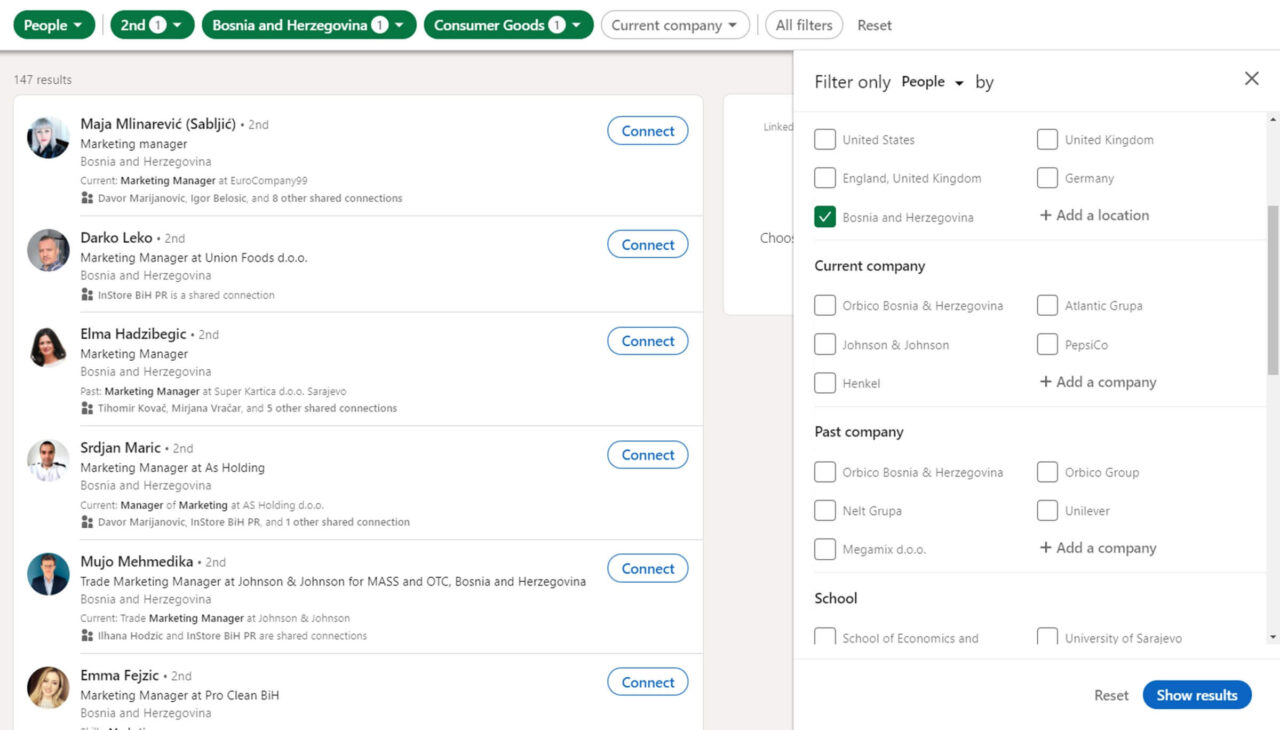
Let’s say I want to connect with marketing managers in the FMCG industry in Bosnia and Herzegovina. First, I type “marketing manager” in LinkedIn’s search bar, select “People,” and start filtering. Initially, I get millions of results, but I narrow them down by applying location and industry filters. Setting the location to “BiH” reduces the results significantly, and adding the “consumer goods” filter brings it to a manageable 198.
To refine it further, I focus on second-degree connections. Remember, LinkedIn has three connection levels: first-degree (direct connections), second-degree (connections of connections), and third-degree (no mutual connections). Filtering to second-degree connections increases the likelihood of successful connections.
See step by step instructions below:
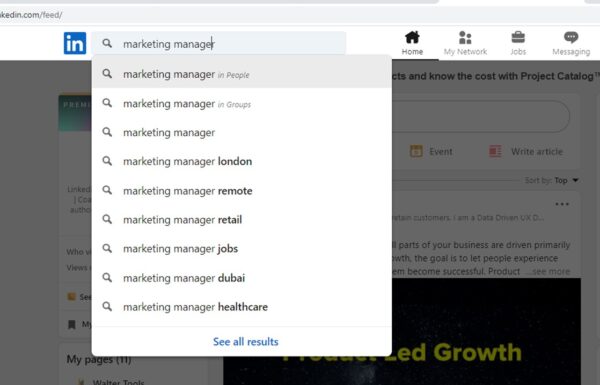
I write marketing manager in the search bar and click enter. And because I am looking for people with the role of marketing manager, I choose the option ‘people.’
I get over 23. million hits. Now, this is a bit difficult to scan. So now my search criteria come in.
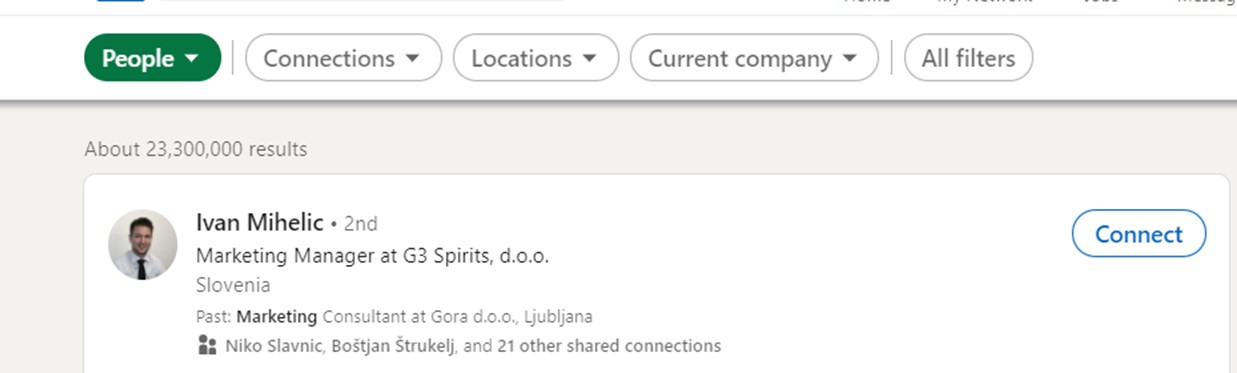
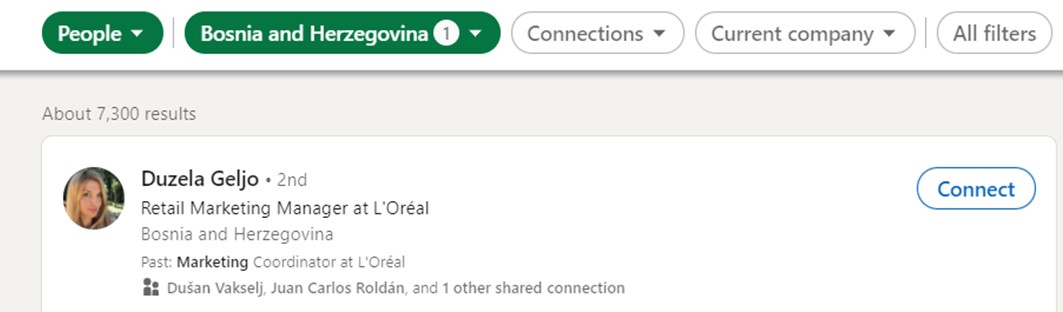
I start applying the filters. The first one is the country, BiH. And the number of hits is down to 7.300
Much better, but still a bit much to process. So I will filter them by the industry, FMCG. I choose the option’ consumer goods’ in filters. And the hits are down to 198.
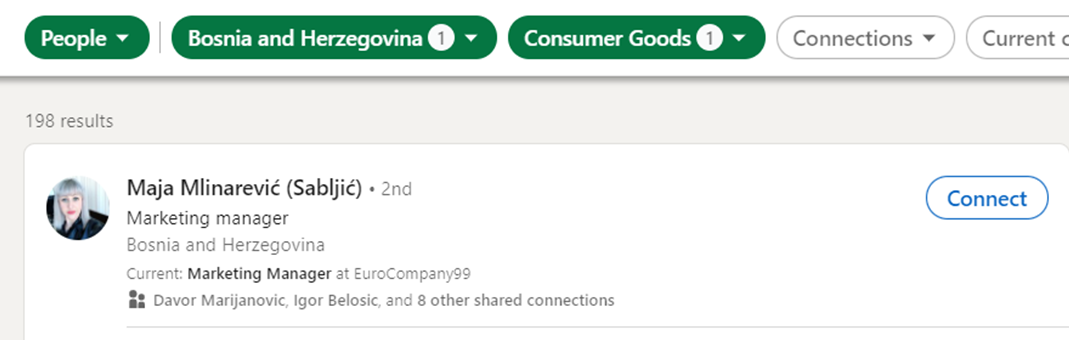
This is much more manageable.
The next step to take is to filter out the 2nd connections. If you remember from previous articles, we have 3 levels of connections; 1st are your connections, 2nd are the connections of your connections, and 3rd are people you have no connection in common. Often, 3rd connections ask for verification, so you may be required to input their email address to connect with them.
So filter out 2nd ones. We probably have the same results based on the number of hits; from this point on, our numbers will differ based on our network.
When I narrow it down, I come to 147 results. You may have a different number of results. From this point on, you can see some of the companies the people work for in Filters and you can start adding Current company filters to it to narrow it all down.
Step 4: Use Boolean Searches to Find Specific Profiles
Even with filters, you might not get precise results, like profiles that include “marketing manager” specifically. That’s where Boolean search comes in. Boolean operators (such as AND, OR, NOT, and quotation marks) help you refine searches:
""– Exact match (e.g., “marketing manager”)AND– Combine terms (e.g., “sales manager” AND “marketing manager”)NOT– Exclude terms (e.g., “sales manager” NOT “director”)OR– Search for alternative terms (e.g., “sales manager” OR “business development manager”)
Using Boolean searches on LinkedIn allows you to pinpoint profiles that match your exact criteria.
Step 5: Crafting Personalized Connection Requests
Once you’ve identified potential connections, take the time to craft a personalized message.* Start by reviewing their LinkedIn profile, especially the Activity section, to see if they’re actively creating or engaging with content. Active users often appreciate it when you reference something they’ve posted. It shows genuine interest and gives your request a personalized touch.
If the person isn’t active on LinkedIn, look for shared interests or backgrounds. Common touchpoints might include:
- Attending the same university
- Working at the same company in the past
- Mutual connections
- Membership in the same organization
Using these elements in your connection request makes the introduction feel natural and increases the likelihood of a positive response.
*Added later – recently (in 2024), LinkedIn has limited the number of personalized connection requests for free profiles to 5 per month.
Step 6: Be Selective and Build a High-Quality LinkedIn Network
Be selective about who you add to your LinkedIn network. Remember, a well-curated, relevant network is much more valuable than a large, unfocused one. By focusing on quality, you build a network that can provide more significant opportunities and stronger professional support.
Strengthening Your LinkedIn Network, One Connection at a Time
Now that you’ve found people who align with your goals, start connecting with them. Each connection you add strengthens your LinkedIn network, enhancing its overall value. Remember, a quality LinkedIn network is like a currency—it’s far more impactful to have a well-connected, targeted network than an extensive, unfocused one.
Following these steps will help you build a LinkedIn network that’s both purposeful and powerful. So, get started on LinkedIn, and build the network that truly supports your goals.
This article was originally written for InStore magazine, issue


